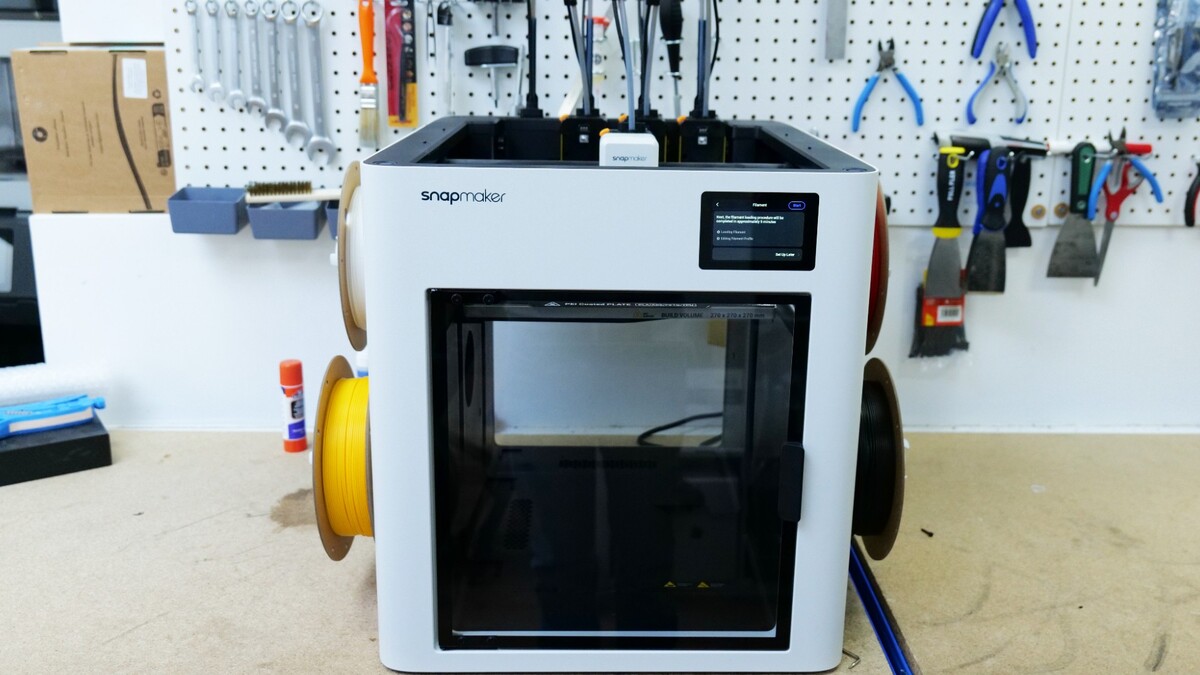
Tool changers have spent most of their history as enthusiast projects or expensive niche machines. The Snapmaker U1 is one of the more serious attempts to make the design an ordinary desktop purchase, and an engineering review published by 3D Printing Industry gives a clearer picture of how that works out. The magazine tested the $899 printer in April 2026 using Snapmaker's own build of Orca Slicer, version 2.3.3. Its conclusion is mixed. The motion system and tool-changing hardware hold up, and much of the trouble sits in software and enclosure details that Snapmaker can fix but hasn't yet.
The U1 arrives with more public expectation than most printers. Its Kickstarter campaign raised $20.6 million from 20,680 backers, and Snapmaker's product page calls it the most-funded 3D printer on the platform. According to the review, Snapmaker says all campaign orders had shipped by 23 December 2025, and retail units followed in April 2026 at $899.
The Hardware: CoreXY With Four Heads Waiting
The U1 is a CoreXY machine with a 270 × 270 × 270 mm build volume. 3D Printing Industry lists a maximum toolhead speed of 500 mm/s and acceleration of 20,000 mm/s². The hotends reach 300 °C and the bed reaches 100 °C. Those figures matter because many earlier multi-material designs gave up speed to get colour.
The main difference is the four independent toolheads. A filament-switching system pushes several materials through one nozzle and has to flush the old colour out at every change. The U1 instead parks four complete hotends and picks up whichever one the next region needs. Snapmaker says each head is preheated, so the incoming tool is already at temperature when it docks. That is why the review's headline calls the printer "purge-free": nozzles are not shared, so there's no purge tower or waste pile for each colour change.
How SnapSwap Works
Snapmaker calls the mechanism SnapSwap and rates a direct tool swap at 5 seconds. The company says it relies on kinematic coupling with mechanical locking. Kinematic coupling is a standard precision-engineering approach in which a set of contact points forces a part back into the same position every time it seats. Mechanical locking then holds it there. For a tool changer this solves the central problem. Four nozzles are only useful if each lands in a known spot relative to the others, or multi-colour layers end up misaligned. Snapmaker claims nozzle offset alignment within 0.04 mm.
Speed is the other half of the trade. On a single-nozzle multi-material system, colour changes can take a large share of total print time once you count retraction, cutting, loading and purging. A five-second swap with a hot tool waiting changes that sum a lot, especially on prints with many colour changes per layer.
Materials: The Top Cover Matters
Buyers should read the material specs closely. Out of the box, 3D Printing Industry says the U1 is rated for PLA, PETG, PCTG, TPU and PVA. That covers most everyday printing. Including PVA is a sensible choice for a tool changer, since one head can print dissolvable supports while the other three handle model colours or materials.
Engineering materials need an accessory. Snapmaker's product page says the Top Cover is sold separately. According to the review, fitting it extends support to PET, ABS, ASA, PA and PC, although the cover was announced but not yet available when the magazine tested the printer. The cover is passive and there's no chamber heater, so any warmth in the enclosure comes from the bed and the machine itself. Makers who print a lot of ABS or ASA will know what that means: an enclosure without active heating helps with drafts and warping, but on large or tall parts in these materials it is not the same as a temperature-controlled chamber. Anyone planning to print nylon or polycarbonate should budget for the cover and test their own geometry before assuming it works.
Setup, Firmware and Monitoring
The review timed the trip from opening the box to a ready printer at about 40 minutes, using only the supplied tools. That is reasonable for a machine with four heads to dock. The firmware is based on Klipper, and the magazine notes that Snapmaker has published its firmware modifications on GitHub. People who already tune Klipper machines will see that as a real advantage, because it means the printer isn't fully locked to the vendor's roadmap. The U1 also includes a 2 MP camera with AI-based failure detection. Snapmaker's product page says its Orca Slicer build has been optimized for the U1.
Where It Fell Short in Testing
The review's list of faults is longer than the spec sheet suggests, and most of it concerns software.
- Side panels: the reviewers described them as flimsy. That is a build-quality point and doesn't affect print results, but at $899 it stands out.
- Printer-slicer connection: the link between the U1 and the slicer was unstable during testing, and restoring it required a full restart of the slicer.
- Cloud uploads: large files uploaded through the cloud path were slow or sometimes failed. Multi-material G-code files can get very large, so this hits hardest on exactly the jobs the U1 is built for.
- Repeated logins: the software logged the user out every time it was launched.
- Time estimates: actual print times ran 15–40% longer than the slicer predicted, and the gap grew with the number of tool changes.
The estimate gap is the most significant item for planning. Slicers often under-predict on machines with aggressive motion settings, because real acceleration and cornering behaviour rarely match the model exactly. A tool changer adds more variables: swap timing, docking moves and the preheat logic around each change. A 15% miss is annoying. A 40% miss on a long job can mean a print that was supposed to finish overnight is still running into the next afternoon. Until the estimates improve, take the slicer's number as a lower bound.
Firmware and slicer updates can address everything on that list except the panels. These results are also from testing in April 2026 on Orca v2.3.3, so later releases may behave differently. Buyers should check current release notes rather than assume the problems are either fixed or still there.
Bottom Line for Makers
The U1 succeeds at the part that's hardest to get right. Four preheated heads, kinematic docking, a claimed 0.04 mm offset tolerance and 5-second swaps on a fast CoreXY frame give genuine tool-changer capability at a price that sits much closer to mainstream than this kind of machine usually does. Avoiding purge waste is a practical benefit for anyone printing multi-colour parts in volume, and dedicated PVA supports make complex geometry easier.
The weak points are the surrounding software and the enclosure. If you mostly print PLA, PETG and TPU and are comfortable with Klipper, the U1 is easy to recommend, with one adjustment: plan long jobs with extra time beyond the slicer's estimate. If you need ABS, ASA, nylon or PC, the real price includes the Top Cover and its limits as a passive enclosure. If you mainly want a printer that connects reliably and stays out of the way, it makes sense to wait for Snapmaker to sort out connectivity, cloud uploads and login persistence.