Bambu Lab published Bambu Studio 2.9.2 on November 24. The release brings slicer support to two different groups of owners. It adds a profile for the P3C, the company's new and cheaper multi-head tool changer. It also adds mixed-nozzle-diameter slicing and printing to the H2D, a dual-nozzle printer that is already on the market. The common thread is that Studio now assigns nozzles by region. Different parts of one model can be printed through different nozzle sizes, and each region gets its own layer height.
The interesting news is about where the feature is going. Bambu is putting tool-changer workflows into a lower price tier and extending the per-region approach to hardware that never had a tool changer.
The P3C: a smaller tool changer
The release notes describe the P3C as supporting up to seven print heads. Each head has its own independent feeding and heating system, and the filament stays loaded in it. According to Bambu, the printer can relay between two filaments in as little as six seconds. That is the main reason to buy a tool changer over a single-nozzle printer with an AMS. You don't cut filament, retract it, or push a long purge through the nozzle between colors.
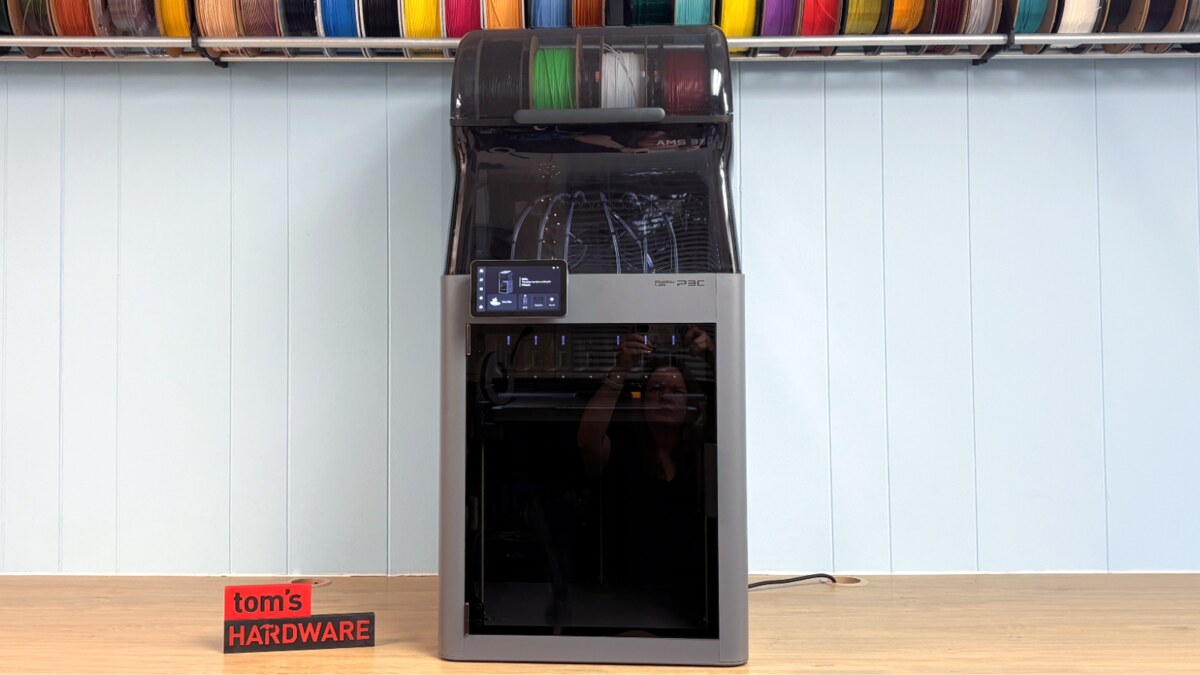
Tom's Hardware's review lists the five-tool P3C at $1,149 (a seven-tool combo is $1,299) and describes it as a more affordable tool changer. The review says the machine ships with five 0.4 mm tools in its AMS 3P and can be expanded to seven. It uses the same Swaptek concept as the larger model: the cooling fans and extruder stay on the toolhead, while each swappable tool carries its own filament path, heater and hardened steel nozzle. Idle tools are preheated, so the next one is close to temperature when it gets picked up. Nozzles range from 0.2 to 0.8 mm, and mixed sizes can be used in one print. There is also an optional 2.85 mm TPU tool and a FlexFeed extruder with what Bambu calls Active Grip Control.
The review is clear about where the money was saved. The AMS 3P has no motor, so you load filament manually all the way to the nozzle. No dryer is included, and the optional 75°C dryer costs $159.90. The review also notes the P3C drops the heated chamber. The build volume is listed as 256 x 256 x 260 mm. With the AMS lid open, the printer needs about 1,212 mm of vertical clearance, which matters if you planned to put it on a shelf. The reviewer's overall verdict is positive: the P3C is a great place to start if you want an upgradable tool changer on a more manageable budget, though loading filament is tedious.
For comparison, TechEnclave reported that the nine-head H3C AMS Combo costs $2,499 in the US, excluding tax and including shipping, and went on sale November 3. Its AMS 3H holds nine spools, and two of those slots have dryers that reach 85°C. The H3C's swap time is also about six seconds. The five-tool P3C costs a little under half as much. You give up heads, the motorized feeding, the heated chamber and the built-in drying, but you keep the same swap speed and the same model of one loaded filament per head.
Mixed nozzle diameters on the H2D
For owners who already have a printer, the more useful change may be H2D support for mixed nozzle diameters. This works with or without the Filament Track Switch. Studio can now give each region of a model a different nozzle diameter, and each region keeps its own layer height. Bambu's release notes give the obvious example: the smaller nozzle prints text and scales, and the larger nozzle prints the main body.
That example describes a familiar compromise. A part with fine lettering or a graduated scale has typically been printed entirely with a small nozzle, which takes hours, or with a large nozzle, which leaves the detail mushy. Assigning nozzles by region removes that trade-off for parts where the fine detail sits in a clearly separate area. The H2D's two nozzles were already useful for printing two materials. Now they can also be split between speed and detail.
There are practical limits. The detail has to be in regions that Studio can separate from the body. Every region assignment also adds another place where calibration has to be right, because two nozzles of different sizes still have to register against each other. We would expect early users to spend some time tuning offsets before trusting the feature on parts that need tight tolerances. The release notes also list known gaps, including that Helio support for H2D multi-diameter is not yet complete.
The rest of the changelog
The smaller items are worth a look too:
- Decimal sparse infill density. You can now set values between whole percentages.
- Cross-part color penetration. A new option that lets color painted on a part's top and bottom surfaces penetrate into adjacent parts.
- Split selected parts into new objects. Selected parts can be split into independent objects.
- Richer preview data. The preview shows per-move nozzle and filament information and print time per filament, which helps when you are working out where a tool-changer job spends its time.
- Mouse rotation sensitivity is now a preference setting.
Among the improvements, the first-layer infill line width for a 0.2 mm nozzle on the H3C and P3C in single-diameter mode is now 0.6 mm. The manual flush volume limit goes up to 2,000 mm³, though the actual flush volume is subject to printer firmware limits. When a cloud send fails, Studio now falls back to a direct LAN connection. Normal and classic tree supports are both faster to generate.
The bug fixes cover a STEP import hang (#13103), zero normals in binary STL files (#12963), a Linux crash on Download and Open (#13063), and a command-line interface that could not exit because it waited on the backup thread (#12875). The CLI fix is a small change, but it matters to anyone running Studio in scripted or batch slicing pipelines.
What It Means for Makers
The P3C is a lower entry price for Bambu's tool changers, and Studio 2.9.2 adds the support for it. For $1,149 you get five heads that keep their filament loaded, can grow to seven, and swap in about six seconds. In exchange you load filament by hand and buy a dryer separately. If you mostly print in one material and use color only occasionally, the H3C's extras may not justify spending more than twice as much, and a single-material shop may not need a tool changer at all. If you work with hygroscopic engineering filaments, the missing dryer is a real cost to add to the comparison.
H2D owners get something new without buying anything. Region-based nozzle assignment with separate layer heights is a real change in how a dual-nozzle printer can be used, and it suits functional parts with small text or measurement markings. Update Studio, put a 0.2 mm nozzle in one side, and test it on a part you already know well before you trust it with production work.